Corrected 23 September 2026: every figure on this page was recomputed from the retained audit and Google Maps data. See the note at the end and Dental Website Statistics 2026.
This report covers 301 Washington dental practice websites from our June 2026 automated audit (practices with fewer than 150 Google reviews, where the audit flagged at least two issues), plus Google ratings for 2,204 Washington practices of every size. It is the Washington cut of our State of Dental Websites 2026 report — same method, same checks, read against the same 24-state benchmark of 6,554 sites.
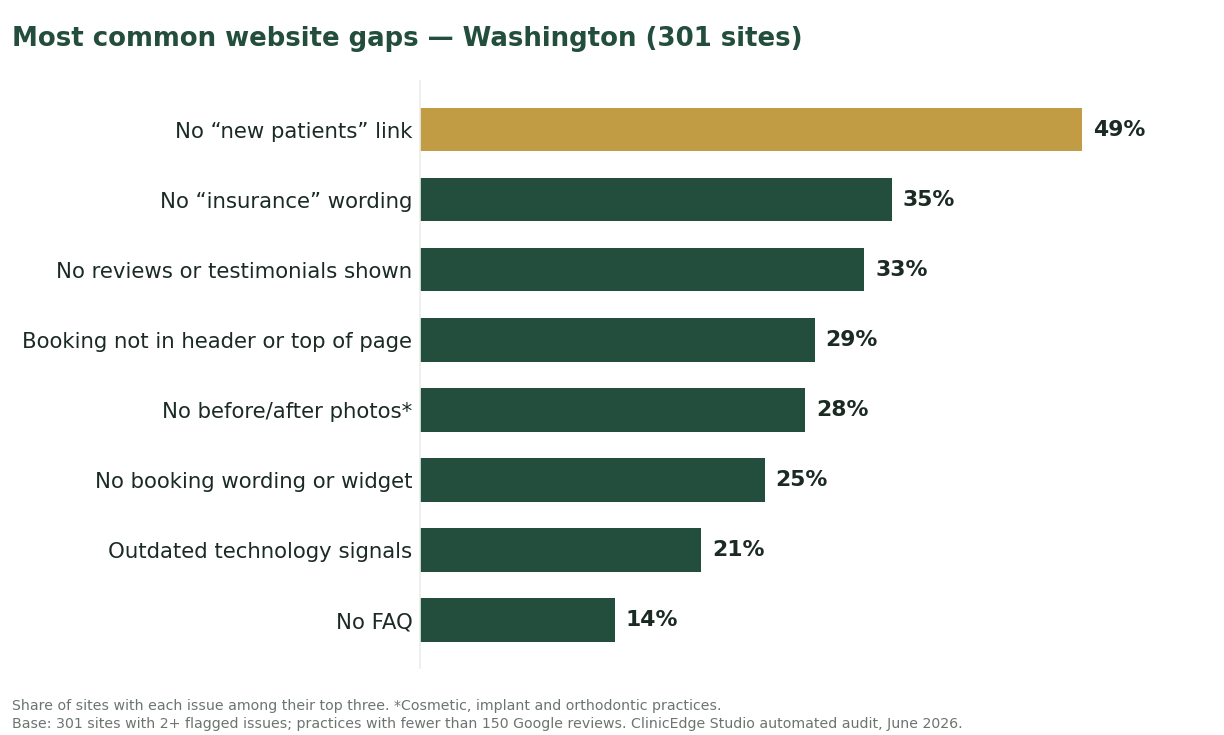
Washington’s defining gap is cosmetic proof. A larger share of audited sites here (28%) are cosmetic, implant or orthodontic practices with no before/after gallery than in any of the other seven states we report on. For those practices, the homepage shows no visual proof of their work.
The short version for Washington
- 49% have no “new patients” link on the homepage or in its menu — a link many first-time visitors look for.
- 35% never use the word “insurance” on the homepage or in its menu.
- 25% have nothing on the homepage labeled for booking or requesting an appointment online, and another 29% have a booking option that is not in the header, the menu or the top of the page.
- 33% show no reviews, star ratings or testimonials on the homepage.
- Across the 2,204 Washington practices we mapped on Google (all sizes, not only those audited), 76% are rated 4.8★ or higher and 67% have 100+ reviews.
The most common gaps in Washington
The leaders aren’t cosmetic. They’re missing answers — “is there a page for me?”, “do you take my insurance?”, “can I book?” — at the moment a patient decides to act.
Washington vs. the 24-state picture
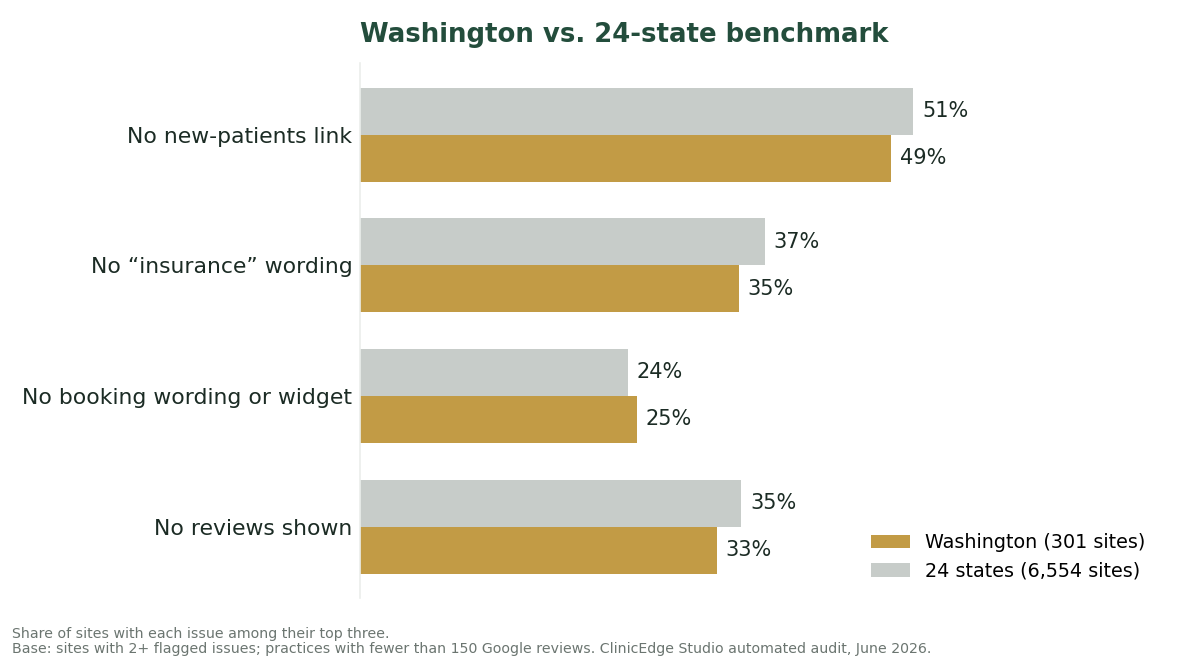
Washington is close to the 24-state average on the four core measures; its real divergence is cosmetic proof (off this chart), where it has the highest rate of the eight states for missing before/after galleries.
The reputation paradox
Here is the tension in the Washington data. Of the 2,204 practices we mapped on Google (all sizes, not only those audited), only 3% are rated below 4.0★ and 76% are rated 4.8★ or higher. And among the audited sites, 16% belong to practices with 50 or more Google reviews that show none of them on the homepage.

A website problem, not a clinical one
Every gap above sits between a patient’s intent and their booking — none of it touches the quality of care. Most of it is content and placement: surface the reviews, insurance answer and new-patient path a Washington practice already has before considering a ground-up rebuild.
If your Washington practice has a strong reputation and a quiet website, the gap between the two is the place to start.
Get your free website audit → · Run your own numbers in our calculator
A note on the numbers. Issue percentages come from ClinicEdge Studio’s June 2026 automated audit: the 301 Washington dental practice websites where the audit flagged at least two issues, counting each site’s top three issues. The audit covered single-location practices with fewer than 150 Google reviews, and leaving out sites with fewer than two flagged issues makes the figures overstate prevalence across all practice websites. With 301 sites, Washington figures carry a margin of error of up to about ±6 points (95% confidence), so differences of a few points between states may not be meaningful. Reputation figures (star ratings and review counts) come from 2,204 Washington practices of every size mapped on Google, most of which were not audited. 24-state figures: the 6,554 such sites across 24 states. All clinics are anonymized. Corrected on 23 September 2026: figures recomputed from the retained audit and Google Maps data; full tables and definitions at Dental Website Statistics 2026.